Processing 互動小程式 - 聲音驅動小風車,還可以切換日夜!
前言
Processing 一直是我 (阿吉) 的心頭好,只要少量又簡易的程式碼就能產生各式各樣的花式介面,極簡風或是華麗風都能輕鬆掌握,還能結合 Arduino 做到軟硬整合。對於初學者還有非常多的小範例,幾乎都能直接執行看到效果,是非常方便好用的教學工具。 除了 Processing 之外,還有 p5.js、Processing Android 與 Processing Python 等,但後兩者看起來已較少維護。 作業系統方面,Windows, MAC 與 Linux 甚至 Raspberry Pi 都能免安裝直接執行。 當然啦,透過 chatGPT 這類工具去發想新點子或修改舊的程式碼都非常方便,多多嘗試就能迸發更多有趣的點子,非常有趣喔!有興趣的讀者們請看看我錄製的 Processing 結合 Arduino 的系列教學。 https://www.youtube.com/watch?v=7C8ZCVtKMsk&list=PLZkpEAYL25ABNUvC4zOeAFPKK6Z2MY8V_程式重點說明
以下說明重點程式碼,完整程式碼請參考本文末。1. 聲音輸入與分析
-
使用 Processing 的
sound函式庫來取得麥克風聲音輸入,用於分析音量變化,並以此作為互動依據。 -
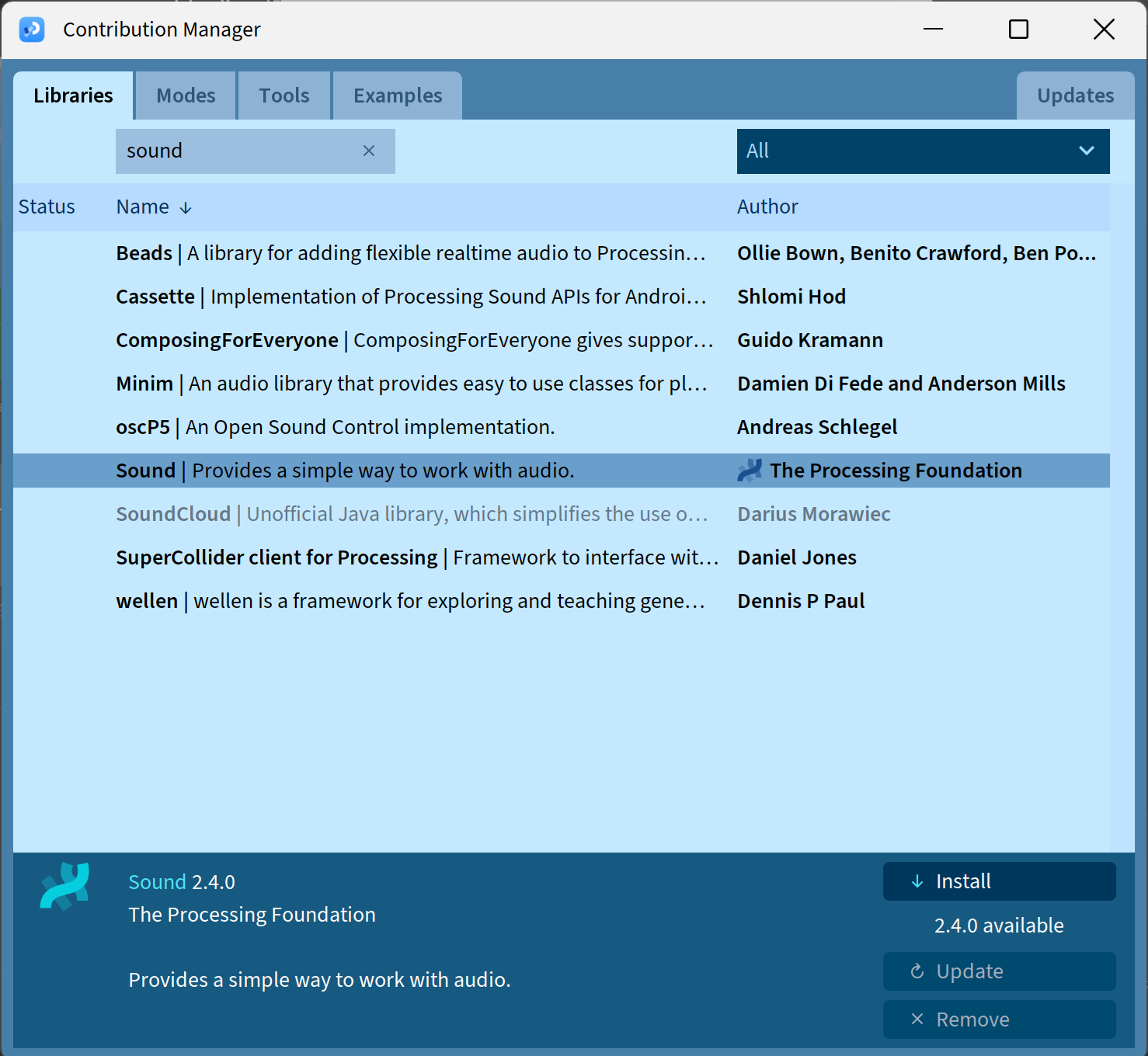
如果尚未安裝請由 Processing 介面中選擇 Sketch > Import Library > Manage Libraries... ,就會出現 Contribution Manager 視窗。在這個視窗中輸入 sound,找到 Sound 函式庫,按下 Install 安裝即可,如下圖:
2. 風車動畫變數
-
這些變數用於控制風車的轉速與角度。
-
每片扇葉有不同顏色,呈現動態色彩變化。
3. 環境設定、背景與太陽
-
模擬草地、雲朵、粒子(如蒲公英、灰塵等),營造動態自然環境。Processing 針對粒子的運動效果有很好的函式庫與範例。
- 根據聲音大小,改變太陽大小、光暈與天空顏色 (
sunSize,sunGlow,skyHue),呈現各種氣氛。
4. 夜間模式與星星
boolean nightMode;
PVector[] stars;
float[] starBrightness;
-
根據音量或特定互動觸發「夜晚場景」,顯示星星與暗色背景。
5. setup() 初始設定
-
設定畫布尺寸與色彩模式。
-
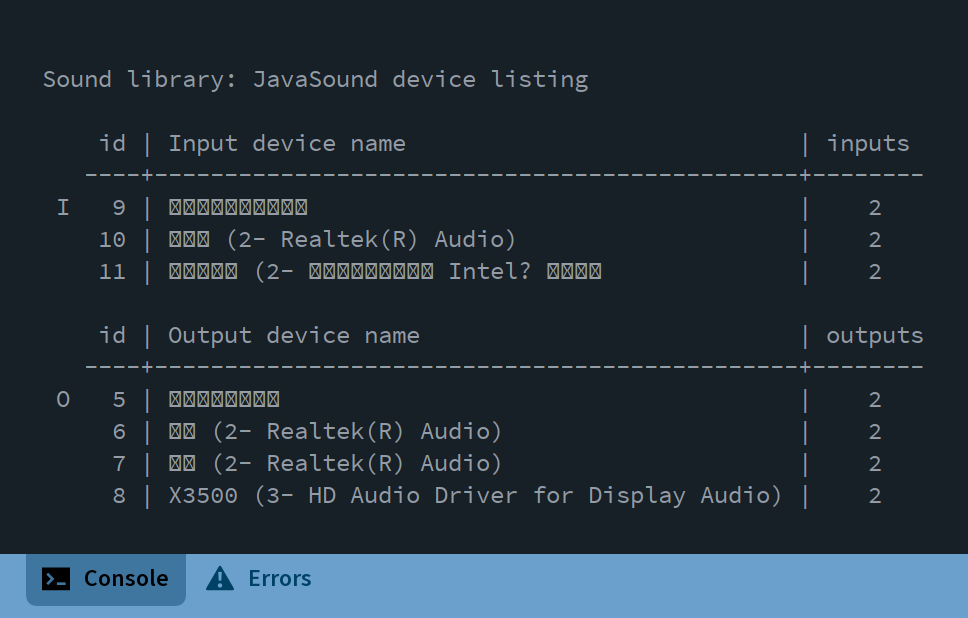
啟動音訊輸入,執行程式後會在 console 看到所執行機器上可用的音訊裝置,如下圖
6. draw() 主迴圈
void draw() {
volume = amp.analyze() * 5;
smoothedVolume = lerp(smoothedVolume, volume, 0.1);
windmillSpeed = smoothedVolume * 10;
windmillAngle += windmillSpeed;
}
核心功能說明:
-
音量控制風車轉速:聲音越大,風車轉越快。
-
偵測「拍點」:若音量突升(如掌聲、拍手),觸發粒子特效與太陽光暈增強。
-
夜間模式切換:按下
'n'鍵切換日夜背景。 -
畫面組成 (細節程式碼請自行參考以下程式碼):
-
drawBackground():天空與太陽(根據音量變色)。 -
updateAndDrawClouds():雲朵移動。 -
drawGrass():前景草地。 -
drawWindmill():風車旋轉。 -
updateAndDrawParticles():粒子隨聲音爆發。 -
drawWaveform():底部音量視覺化。 -
displayVolumeInfo():顯示目前音量與風車轉速,位於畫面左下角。 displayInstructions():顯示目前音量數值,位於畫面右下角。
-
7. 自定義類別(共 2 個)
為了更有效呈現雲、粒子等不規則的物體動態,定義了兩個自訂物件類別來管理:
class Cloud
-
雲朵的 位置、速度、大小 設定。
-
持續向右飄動,出畫面後重生。
class Particle
-
用於表現「音量爆發」的粒子煙火效果。
-
每個粒子有位置、速度、透明度,並會隨時間淡出。
// 聲控風車互動視覺系統
// 使用麥克風音量控制風車旋轉速度和視覺效果


import processing.sound.*;


// 聲音分析變數
Amplitude amp;
AudioIn mic;
float volume = 0;
float smoothedVolume = 0;
float[] volumeHistory = new float[100];


// 風車變數
float windmillAngle = 0;
float windmillSpeed = 0;
float bladeLength = 120;
int bladeCount = 4;
color[] bladeColors = {
  color(255, 100, 100),   // 紅色
  color(255, 200, 100),   // 橘色
  color(100, 255, 100),   // 綠色
  color(100, 200, 255)    // 藍色
};


// 環境變數
float grassHeight = 100;
ArrayList<Cloud> clouds = new ArrayList<Cloud>();
ArrayList<Particle> particles = new ArrayList<Particle>();
float windStrength = 0;
float sunSize = 80;
float sunGlow = 0;
float skyHue = 210;
int lastBeat = 0;
boolean nightMode = false;
int starCount = 100;
PVector[] stars;
float[] starBrightness;


// 設定初始參數
void setup() {
  size(800, 600);
  colorMode(HSB, 360, 100, 100, 100);

  // 初始化麥克風輸入和音量檢測
  Sound.list();
  Sound s = new Sound(this);
  amp = new Amplitude(this);
  mic = new AudioIn(this, 0);
  mic.start();
  amp.input(mic);

  // 初始化音量歷史紀錄
  for (int i = 0; i < volumeHistory.length; i++) {
    volumeHistory[i] = 0;
  }

  // 初始化雲朵
  for (int i = 0; i < 5; i++) {
    clouds.add(new Cloud(random(width), random(height/3)));
  }

  // 初始化星星
  stars = new PVector[starCount];
  starBrightness = new float[starCount];
  for (int i = 0; i < starCount; i++) {
    stars[i] = new PVector(random(width), random(height/2));
    starBrightness[i] = random(30, 100);
  }
}


void draw() {
  // 獲取麥克風音量並平滑處理
  volume = amp.analyze() * 5; // 放大音量值
  smoothedVolume = lerp(smoothedVolume, volume, 0.1);

  // 更新音量歷史紀錄
  for (int i = 0; i < volumeHistory.length-1; i++) {
    volumeHistory[i] = volumeHistory[i+1];
  }
  volumeHistory[volumeHistory.length-1] = smoothedVolume;

  // 根據音量更新風車速度
  windmillSpeed = smoothedVolume * 10;
  windmillAngle += windmillSpeed;

  // 根據音量更新風力
  windStrength = smoothedVolume * 2;

  // 根據音量檢測重拍並創建特效
  if (volume > 0.4 && millis() - lastBeat > 300) {
    createParticleExplosion();
    sunGlow = min(sunGlow + 20, 50);
    lastBeat = millis();
  }

  // 降低太陽光暈
  sunGlow = max(sunGlow - 0.5, 0);

  // 切換日夜模式
  if (keyPressed && key == 'n') {
    nightMode = !nightMode;
  }

  // 繪製背景
  drawBackground();

  // 繪製雲朵
  updateAndDrawClouds();

  // 繪製草地
  drawGrass();

  // 繪製風車
  drawWindmill();

  // 更新並繪製粒子
  updateAndDrawParticles();

  // 繪製視覺化的音量波形
  drawWaveform();

  // 顯示音量數值信息
  displayVolumeInfo();

  // 顯示操作說明
  displayInstructions();
}


// 繪製背景(天空、太陽/月亮)
void drawBackground() {
  float skyBrightness = nightMode ? 20 : 90 - smoothedVolume * 10;
  float skySaturation = nightMode ? 60 : 20 + smoothedVolume * 20;

  for (int y = 0; y < height * 0.7; y++) {
    float gradientPos = map(y, 0, height * 0.7, 0, 1);
    float hue = nightMode ? 240 : skyHue;
    float brightness = nightMode ?
                        map(gradientPos, 0, 1, 20, 5) :
                        map(gradientPos, 0, 1, skyBrightness, skyBrightness - 10);
    float saturation = nightMode ?
                        map(gradientPos, 0, 1, 30, 60) :
                        map(gradientPos, 0, 1, skySaturation, skySaturation + 10);

    stroke(hue, saturation, brightness);
    line(0, y, width, y);
  }

  if (nightMode) {
    for (int i = 0; i < starCount; i++) {
      float brightness = starBrightness[i] + sin(frameCount * 0.05 + i) * 20;
      fill(60, 10, brightness);
      noStroke();
      float starSize = 1 + smoothedVolume;
      ellipse(stars[i].x, stars[i].y, starSize, starSize);
    }
  }

  if (nightMode) {
    pushMatrix();
    translate(width * 0.8, height * 0.2);
    fill(60, 10, 90);
    noStroke();
    ellipse(0, 0, sunSize, sunSize);
    fill(60, 10, 80, 30);
    ellipse(-sunSize/4, -sunSize/4, sunSize/2, sunSize/2);
    ellipse(sunSize/5, sunSize/5, sunSize/3, sunSize/3);
    popMatrix();
  } else {
    pushMatrix();
    translate(width * 0.8, height * 0.2);
    for (int i = 0; i < 3; i++) {
      float alpha = map(i, 0, 3, sunGlow, 0);
      float size = sunSize * (1 + i * 0.5 * (1 + smoothedVolume));
      fill(40, 80, 100, alpha);
      ellipse(0, 0, size, size);
    }
    fill(40, 80, 100);
    ellipse(0, 0, sunSize, sunSize);
    stroke(40, 80, 100, 70);
    for (int i = 0; i < 12; i++) {
      float angle = i * TWO_PI / 12;
      float rayLength = sunSize * (0.7 + smoothedVolume);
      pushMatrix();
      rotate(angle + frameCount * 0.01);
      strokeWeight(3);
      line(0, 0, rayLength, 0);
      popMatrix();
    }
    popMatrix();
  }
}


void drawWindmill() {
  float centerX = width / 2;
  float centerY = height * 0.7 - grassHeight * 0.7;

  fill(30, 30, 80);
  noStroke();
  rect(centerX - 15, centerY, 30, height - centerY);

  fill(0, 0, 60);
  ellipse(centerX, centerY, 40, 40);

  pushMatrix();
  translate(centerX, centerY);
  rotate(radians(windmillAngle));

  float bladeLengthFactor = 1 + smoothedVolume * 0.2;
  float bladeWidthFactor = 1 + smoothedVolume * 0.5;

  for (int i = 0; i < bladeCount; i++) {
    pushMatrix();
    rotate(i * TWO_PI / bladeCount);
    color bladeColor = bladeColors[i % bladeColors.length];
    fill(hue(bladeColor), saturation(bladeColor), brightness(bladeColor));

    beginShape();
    vertex(0, 0);
    vertex(-15 * bladeWidthFactor, bladeLength * 0.3 * bladeLengthFactor);
    vertex(0, bladeLength * bladeLengthFactor);
    vertex(15 * bladeWidthFactor, bladeLength * 0.3 * bladeLengthFactor);
    endShape(CLOSE);

    if (smoothedVolume > 0.2) {
      fill(hue(bladeColor), saturation(bladeColor) * 0.5, brightness(bladeColor) * 1.5, 70);
      ellipse(0, bladeLength * 0.5 * bladeLengthFactor,
              15 * bladeWidthFactor, bladeLength * 0.5 * bladeLengthFactor);
    }
    popMatrix();
  }

  fill(0, 0, 90);
  ellipse(0, 0, 20, 20);
  popMatrix();

  if (windmillSpeed > 1) {
    createWindmillParticles(centerX, centerY);
  }
}


void drawGrass() {
  fill(120, 70, 60);
  noStroke();
  rect(0, height * 0.7, width, height * 0.3);

  int grassCount = 50;
  for (int i = 0; i < grassCount; i++) {
    float x = map(i, 0, grassCount, 0, width);
    float grassWave = sin(frameCount * 0.05 + i * 0.3) * windStrength;
    float grassHeight = this.grassHeight * (1 + volumeHistory[i % volumeHistory.length] * 0.5);

    pushMatrix();
    translate(x, height * 0.7);
    float greenHue = 120 + volumeHistory[i % volumeHistory.length] * 20;
    stroke(greenHue, 70, 60);
    strokeWeight(2 + volumeHistory[i % volumeHistory.length] * 3);

    beginShape();
    for (int j = 0; j < 10; j++) {
      float t = j / 9.0;
      float grassX = grassWave * t * t;
      float grassY = -grassHeight * t;
      vertex(grassX, grassY);
    }
    endShape();
    popMatrix();
  }
}


void updateAndDrawClouds() {
  for (Cloud cloud : clouds) {
    cloud.update();
    cloud.display();
  }
}


void createWindmillParticles(float x, float y) {
  float angle = random(TWO_PI);
  float distance = random(20, 30);
  float particleX = x + cos(angle) * distance;
  float particleY = y + sin(angle) * distance;
  float hue = map(windmillSpeed, 0, 20, 200, 300);
  color particleColor = color(hue, 80, 100, 70);
  particles.add(new Particle(particleX, particleY, particleColor));
}


void createParticleExplosion() {
  float centerX = width / 2;
  float centerY = height * 0.7 - grassHeight * 0.7;
  for (int i = 0; i < 20; i++) {
    float angle = random(TWO_PI);
    float distance = random(30, 50);
    float particleX = centerX + cos(angle) * distance;
    float particleY = centerY + sin(angle) * distance;
    float hue = random(360);
    color particleColor = color(hue, 80, 100, 80);
    Particle p = new Particle(particleX, particleY, particleColor);
    p.velocity = new PVector(cos(angle) * random(1, 3), sin(angle) * random(1, 3));
    particles.add(p);
  }
}


void updateAndDrawParticles() {
  for (int i = particles.size() - 1; i >= 0; i--) {
    Particle p = particles.get(i);
    p.update();
    p.display();
    if (p.isDead()) {
      particles.remove(i);
    }
  }
}


void drawWaveform() {
  stroke(nightMode ? color(210, 70, 90) : color(30, 70, 90));
  strokeWeight(2);
  noFill();
  beginShape();
  for (int i = 0; i < volumeHistory.length; i++) {
    float x = map(i, 0, volumeHistory.length, width * 0.1, width * 0.9);
    float y = height * 0.85 - volumeHistory[i] * 100;
    vertex(x, y);
  }
  endShape();
}


void displayVolumeInfo() {
  fill(nightMode ? color(0, 0, 90) : color(0, 0, 30));
  textSize(14);
  text("環境音量: " + nf(volume, 0, 2), 20, height - 40);
  text("風車速度: " + nf(windmillSpeed, 0, 2), 20, height - 20);
}


void displayInstructions() {
  fill(nightMode ? color(0, 0, 90) : color(0, 0, 30));
  textSize(14);
  text("按 'n' 切換日/夜模式", width - 150, height - 20);
}


class Cloud {
  float x, y;
  float speed;
  float size;
  float opacity;
  float[] bumpSizes;
  float[] bumpOffsets;

  Cloud(float x, float y) {
    this.x = x;
    this.y = y;
    this.speed = random(0.2, 0.5);
    this.size = random(50, 120);
    this.opacity = random(70, 90);
    int bumpCount = int(random(4, 7));
    bumpSizes = new float[bumpCount];
    bumpOffsets = new float[bumpCount];
    for (int i = 0; i < bumpCount; i++) {
      bumpSizes[i] = random(0.6, 1.0);
      bumpOffsets[i] = random(TWO_PI);
    }
  }

  void update() {
    x += speed + windStrength * 0.2;
    if (x > width + size) {
      x = -size;
      y = random(height/4);
    }
    y += sin(frameCount * 0.01 + x * 0.01) * 0.2;
  }

  void display() {
    noStroke();
    if (nightMode) fill(230, 20, 40, opacity);
    else fill(0, 0, 100, opacity);
    pushMatrix();
    translate(x, y);
    float cloudSizeFactor = 1 + smoothedVolume * 0.1;
    ellipse(0, 0, size * cloudSizeFactor, size * 0.6 * cloudSizeFactor);
    for (int i = 0; i < bumpSizes.length; i++) {
      float angle = map(i, 0, bumpSizes.length, 0, TWO_PI) + bumpOffsets[i];
      float bx = cos(angle) * size * 0.4;
      float by = sin(angle) * size * 0.3;
      ellipse(bx, by, size * bumpSizes[i] * cloudSizeFactor, size * bumpSizes[i] * cloudSizeFactor);
    }
    popMatrix();
  }
}


class Particle {
  PVector position;
  PVector velocity;
  PVector acceleration;
  color particleColor;
  float size;
  float lifespan;

  Particle(float x, float y, color c) {
    position = new PVector(x, y);
    velocity = new PVector(random(-1, 1), random(-2, -0.5));
    acceleration = new PVector(0, 0.05);
    particleColor = c;
    size = random(3, 8);
    lifespan = 255;
  }

  void update() {
    PVector wind = new PVector(windStrength * 0.1, 0);
    velocity.add(wind);
    velocity.add(acceleration);
    position.add(velocity);
    lifespan -= 5;
    velocity.mult(0.98);
  }

  void display() {
    noStroke();
    color displayColor = color(hue(particleColor), saturation(particleColor), brightness(particleColor), map(lifespan, 0, 255, 0, 100));
    fill(displayColor);
    if (smoothedVolume > 0.3) {
      pushMatrix();
      translate(position.x, position.y);
      rotate(frameCount * 0.1);
      beginShape();
      for (int i = 0; i < 5; i++) {
        float angle = i * TWO_PI / 5;
        vertex(cos(angle) * size, sin(angle) * size);
        angle += TWO_PI / 10;
        vertex(cos(angle) * (size * 0.4), sin(angle) * (size * 0.4));
      }
      endShape(CLOSE);
      popMatrix();
    } else {
      ellipse(position.x, position.y, size, size);
    }
  }

  boolean isDead() {
    return lifespan <= 0;
  }
}
執行
請按下 Processing IDE 中的執行按鈕,即可看到以下畫面。雲朵飄動的效果我很喜歡。 拍拍手或是對著麥克風吹氣就會看到風車轉動速度以及粒子噴發速度會隨著環境音量變化,太陽與背景的草也會跟著變動。按下鍵盤的n 鍵就會切換白天晚上喔!
Processing 提供的範例真的很豐富,歡迎大家多多開起來玩玩看!沒有安裝也可以從網頁來看各個範例的執行效果。
 [gallery columns="2" size="medium" ids="61328,61327"]
留言 💬 (0)
還沒有留言,來當第一個。