【Micro:bit】一次學Micro:bit就有概念!?是的,請看這一篇(一)
關於這套Boson Starter Kit for Micro:bit,先前已有開箱文介紹,當然對某些讀者而言還想要多瞭解可以如何使用,以及可做出什麼成果。為此,小編推出一系列使用心得文,並同時補充使用者手冊裡的圖文內容,方便讀者操作。
| 作者/攝影 | 陳怡璇 |
| 時間 | 10mins |
| 難度 |
★☆☆☆☆ |
| 材料表 |
|
第一題:神秘的Micro:bit(專案一)
Step1: [caption id="attachment_24828" align="aligncenter" width="1020"]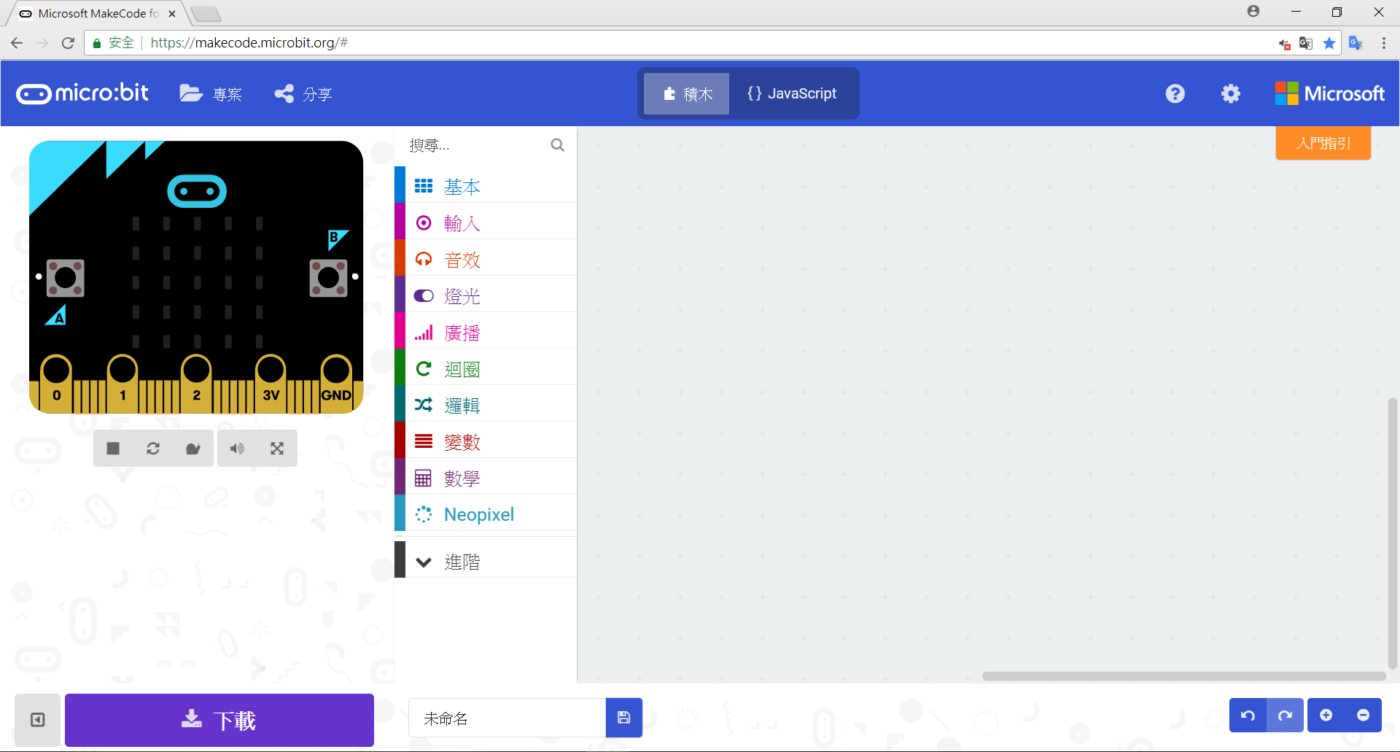 圖1 開啟一個新專案[/caption]
Step2:
[caption id="attachment_24829" align="aligncenter" width="601"]
圖1 開啟一個新專案[/caption]
Step2:
[caption id="attachment_24829" align="aligncenter" width="601"]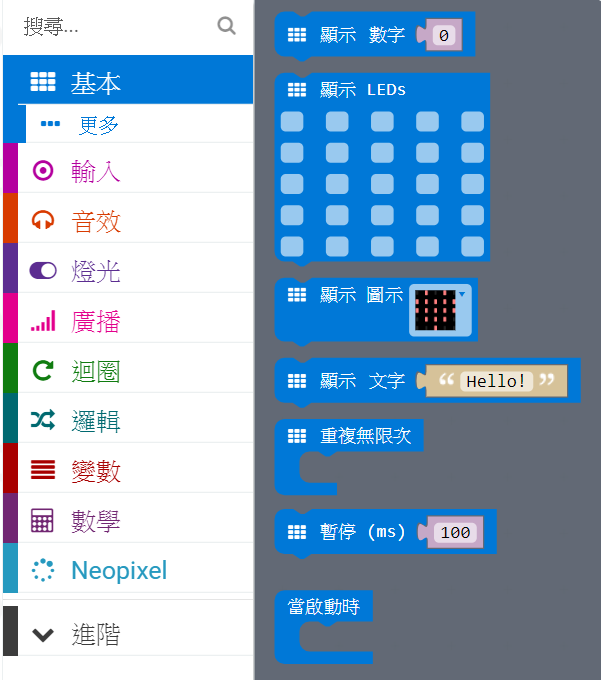 圖2 找到基本積木櫃內的「顯示LEDs」[/caption]
Step3:
[caption id="attachment_24830" align="aligncenter" width="138"]
圖2 找到基本積木櫃內的「顯示LEDs」[/caption]
Step3:
[caption id="attachment_24830" align="aligncenter" width="138"] 圖3 在基本積木櫃內找到「當啟動時」[/caption]
Step4和Step5:
[caption id="attachment_24831" align="aligncenter" width="281"]
圖3 在基本積木櫃內找到「當啟動時」[/caption]
Step4和Step5:
[caption id="attachment_24831" align="aligncenter" width="281"]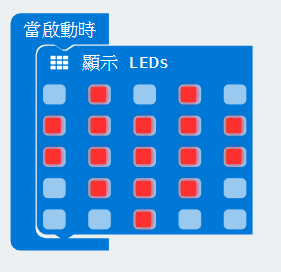 圖4 在一開始時顯示愛心圖[/caption]
練習看看:
把Step3的開始換成重複無限多次,這樣才能夠一直轉換。然後在原本的愛心下面再放入一個顯示的積木,點出自己想要的圖案。這裡要注意的是,顯示的積木下面都要再加入一個暫停(也在基本積木櫃內),這樣才不會在兩個圖片轉換時只能看到殘影。 [caption id="attachment_24832" align="aligncenter" width="334"]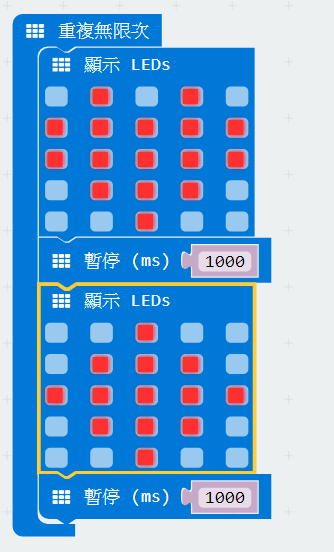 圖5 愛心與菱形每秒變換[/caption]
[video width="1920" height="1088" mp4="https://cd.ainfinity.tw/media/2018/07/LED變換.mp4"][/video]
圖5 愛心與菱形每秒變換[/caption]
[video width="1920" height="1088" mp4="https://cd.ainfinity.tw/media/2018/07/LED變換.mp4"][/video]
第二題: 閃爍的LED燈
Step1: [caption id="attachment_24833" align="aligncenter" width="749"]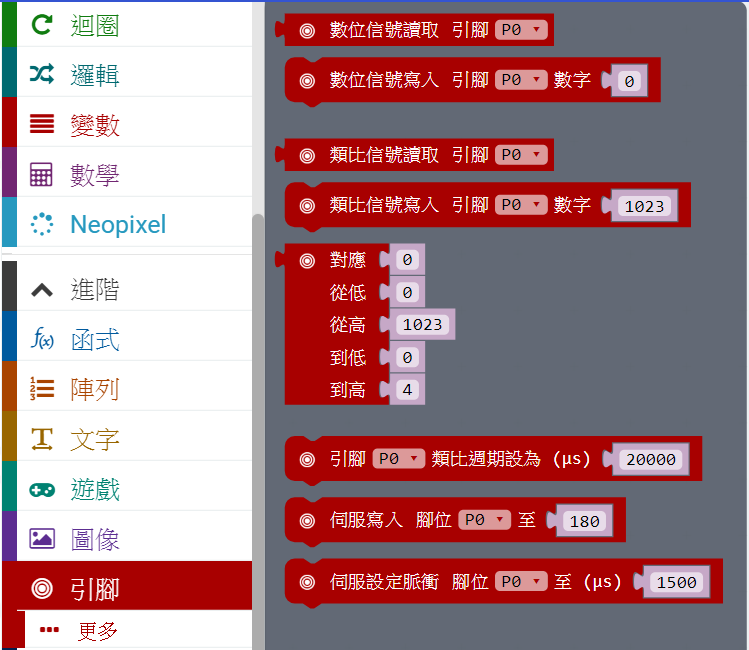 圖6 找到進階->引腳[/caption]
Step2和Step3:
[caption id="attachment_24834" align="aligncenter" width="443"]
圖6 找到進階->引腳[/caption]
Step2和Step3:
[caption id="attachment_24834" align="aligncenter" width="443"]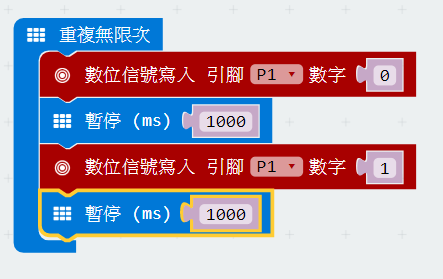 圖7 P1引腳閃爍間隔一秒[/caption]
[video width="1920" height="1088" mp4="https://cd.ainfinity.tw/media/2018/07/LED閃爍.mp4"][/video]
圖7 P1引腳閃爍間隔一秒[/caption]
[video width="1920" height="1088" mp4="https://cd.ainfinity.tw/media/2018/07/LED閃爍.mp4"][/video]
練習看看:
SOS訊號裡,S的訊號是三次短燈號,O是三次長燈號。所以,我們可依照前面閃爍燈的積木,改成SOS訊號燈,不過因它是重複三次後要換另一個訊號燈,所以要先在迴圈積木櫃內找到重複4次(如圖8)。然後改裝成圖9的樣子。這裡要注意的是,S跟O的訊號中間要再加上一個暫停,暫停的時間就是S跟O的時間差,這樣訊號變化時才會很清楚。 [caption id="attachment_24835" align="aligncenter" width="581"]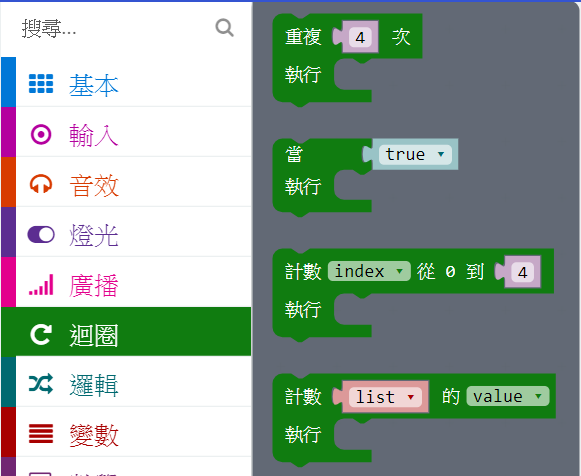 圖8 找到迴圈積木櫃內的重複4次[/caption]
[caption id="attachment_24836" align="aligncenter" width="532"]
圖8 找到迴圈積木櫃內的重複4次[/caption]
[caption id="attachment_24836" align="aligncenter" width="532"]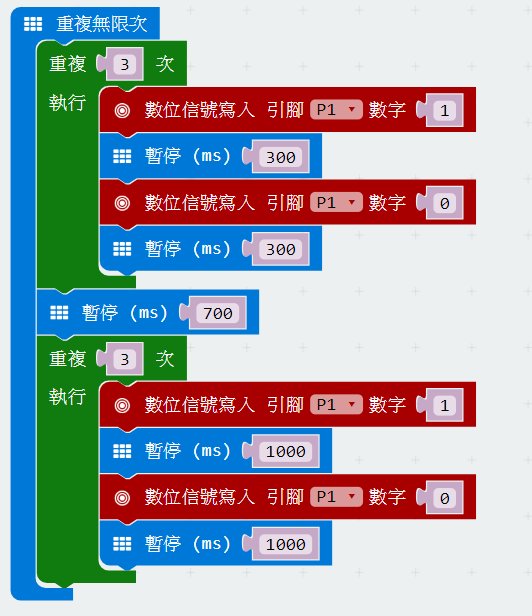 圖9 (SOS)[/caption]
第三題:通知燈
Step1:同閃爍的LED燈的Step2。 Step2: [caption id="attachment_24837" align="aligncenter" width="193"]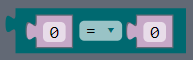 圖10 找到「等號」[/caption]
[caption id="attachment_24838" align="aligncenter" width="569"]
圖10 找到「等號」[/caption]
[caption id="attachment_24838" align="aligncenter" width="569"]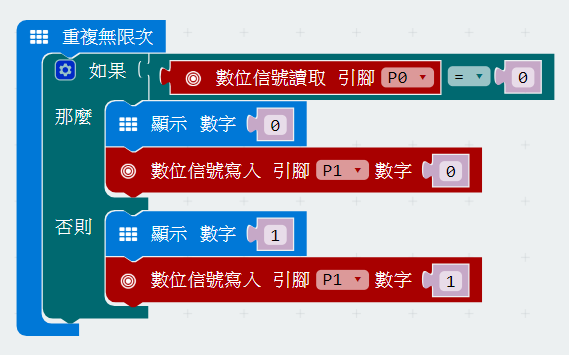 圖11[/caption]
Step3:
[caption id="attachment_24839" align="aligncenter" width="431"]
圖11[/caption]
Step3:
[caption id="attachment_24839" align="aligncenter" width="431"] 圖12[/caption]
[caption id="attachment_24840" align="aligncenter" width="704"]
圖12[/caption]
[caption id="attachment_24840" align="aligncenter" width="704"]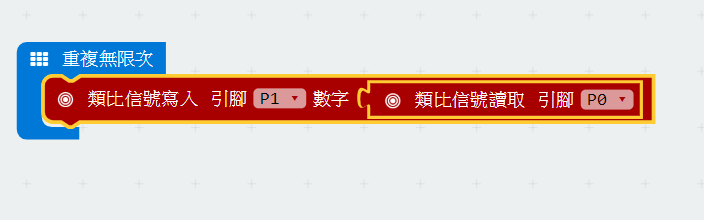 圖13[/caption]
[video width="1920" height="1088" mp4="https://cd.ainfinity.tw/media/2018/07/調整LED亮度.mp4"][/video]
程式積木完成並燒錄至Micro:bit之後,我們可以透過一些素材,例如樂高積木、壓克力板、厚紙板⋯⋯等等,使成品更像檯燈。盡情發揮您的創意吧!
圖13[/caption]
[video width="1920" height="1088" mp4="https://cd.ainfinity.tw/media/2018/07/調整LED亮度.mp4"][/video]
程式積木完成並燒錄至Micro:bit之後,我們可以透過一些素材,例如樂高積木、壓克力板、厚紙板⋯⋯等等,使成品更像檯燈。盡情發揮您的創意吧!
留言 💬 (0)
還沒有留言,來當第一個。