Microsoft Azure 認知服務 - 語音 API
本文將說明如何建立 Microsoft Azure 認知服務的語音API金鑰,並用兩個簡單的小程式來做到語音輸入轉文字,以及文字轉語音。您可以在 Raspberry Pi 上呼叫來做到各種語音互動的效果。範例皆參考 Microsoft 原廠文件
 [pastacode lang="python" manual="import%20azure.cognitiveservices.speech%20as%20speechsdk%0A%0A%23%20Creates%20an%20instance%20of%20a%20speech%20config%20with%20specified%20subscription%20key%20and%20service%20region.%0A%23%20Replace%20with%20your%20own%20subscription%20key%20and%20service%20region%20(e.g.%2C%20%22westus%22).%0Aspeech_key%2C%20service_region%20%3D%20%2239aca37122c049dfae2420933131f684%22%2C%20%22westus%22%0Aspeech_config%20%3D%20speechsdk.SpeechConfig(subscription%3Dspeech_key%2C%20region%3Dservice_region)%0A%0A%23%20Creates%20a%20recognizer%20with%20the%20given%20settings%0Aspeech_recognizer%20%3D%20speechsdk.SpeechRecognizer(speech_config%3Dspeech_config)%0A%0Aprint(%22Say%20something...%22)%0A%0A%0A%23%20Starts%20speech%20recognition%2C%20and%20returns%20after%20a%20single%20utterance%20is%20recognized.%20The%20end%20of%20a%0A%23%20single%20utterance%20is%20determined%20by%20listening%20for%20silence%20at%20the%20end%20or%20until%20a%20maximum%20of%2015%0A%23%20seconds%20of%20audio%20is%20processed.%20%20The%20task%20returns%20the%20recognition%20text%20as%20result.%20%0A%23%20Note%3A%20Since%20recognize_once()%20returns%20only%20a%20single%20utterance%2C%20it%20is%20suitable%20only%20for%20single%0A%23%20shot%20recognition%20like%20command%20or%20query.%20%0A%23%20For%20long-running%20multi-utterance%20recognition%2C%20use%20start_continuous_recognition()%20instead.%0Aresult%20%3D%20speech_recognizer.recognize_once()%0A%0Aif%20('hello'%20in%20result)%3A%0A%20%20%20%20print(%22hello%22)%0A%0A%23%20Checks%20result.%0Aif%20result.reason%20%3D%3D%20speechsdk.ResultReason.RecognizedSpeech%3A%0A%20%20%20%20print(%22Recognized%3A%20%7B%7D%22.format(result.text))%0Aelif%20result.reason%20%3D%3D%20speechsdk.ResultReason.NoMatch%3A%0A%20%20%20%20print(%22No%20speech%20could%20be%20recognized%3A%20%7B%7D%22.format(result.no_match_details))%0Aelif%20result.reason%20%3D%3D%20speechsdk.ResultReason.Canceled%3A%0A%20%20%20%20cancellation_details%20%3D%20result.cancellation_details%0A%20%20%20%20print(%22Speech%20Recognition%20canceled%3A%20%7B%7D%22.format(cancellation_details.reason))%0A%20%20%20%20if%20cancellation_details.reason%20%3D%3D%20speechsdk.CancellationReason.Error%3A%0A%20%20%20%20%20%20%20%20print(%22Error%20details%3A%20%7B%7D%22.format(cancellation_details.error_details))" message="MS 語音API - 語音輸入轉文字" highlight="" provider="manual"/]
 [pastacode lang="python" manual="'''%0AAfter%20you've%20set%20your%20subscription%20key%2C%20run%20this%20application%20from%20your%20working%0Adirectory%20with%20this%20command%3A%20python%20TTSSample.py%0A'''%0Aimport%20os%2C%20requests%2C%20time%0Afrom%20xml.etree%20import%20ElementTree%0Afrom%20playsound%20import%20playsound%0A%0A%23%20This%20code%20is%20required%20for%20Python%202.7%0Atry%3A%20input%20%3D%20raw_input%0Aexcept%20NameError%3A%20pass%0A%0A'''%0AIf%20you%20prefer%2C%20you%20can%20hardcode%20your%20subscription%20key%20as%20a%20string%20and%20remove%0Athe%20provided%20conditional%20statement.%20However%2C%20we%20do%20recommend%20using%20environment%0Avariables%20to%20secure%20your%20subscription%20keys.%20The%20environment%20variable%20is%0Aset%20to%20SPEECH_SERVICE_KEY%20in%20our%20sample.%0A%0AFor%20example%3A%0Asubscription_key%20%3D%20%22Your-Key-Goes-Here%22%0A'''%0A%0Aif%20'SPEECH_SERVICE_KEY'%20in%20os.environ%3A%0A%20%20%20%20subscription_key%20%3D%20os.environ%5B'SPEECH_SERVICE_KEY'%5D%0Aelse%3A%0A%20%20%20%20print('Environment%20variable%20for%20your%20subscription%20key%20is%20not%20set.')%0A%20%20%20%20exit()%0A%0Aclass%20TextToSpeech(object)%3A%0A%20%20%20%20def%20__init__(self%2C%20subscription_key)%3A%0A%20%20%20%20%20%20%20%20self.subscription_key%20%3D%20subscription_key%0A%20%20%20%20%20%20%20%20self.tts%20%3D%20input(%22What%20would%20you%20like%20to%20convert%20to%20speech%3A%20%22)%0A%20%20%20%20%20%20%20%20self.timestr%20%3D%20time.strftime(%22%25Y%25m%25d-%25H%25M%22)%0A%20%20%20%20%20%20%20%20self.access_token%20%3D%20None%0A%0A%20%20%20%20'''%0A%20%20%20%20The%20TTS%20endpoint%20requires%20an%20access%20token.%20This%20method%20exchanges%20your%0A%20%20%20%20subscription%20key%20for%20an%20access%20token%20that%20is%20valid%20for%20ten%20minutes.%0A%20%20%20%20'''%0A%20%20%20%20def%20get_token(self)%3A%0A%20%20%20%20%20%20%20%20fetch_token_url%20%3D%20%22https%3A%2F%2Fwestus.api.cognitive.microsoft.com%2Fsts%2Fv1.0%2FissueToken%22%0A%20%20%20%20%20%20%20%20headers%20%3D%20%7B%0A%20%20%20%20%20%20%20%20%20%20%20%20'Ocp-Apim-Subscription-Key'%3A%20self.subscription_key%0A%20%20%20%20%20%20%20%20%7D%0A%20%20%20%20%20%20%20%20response%20%3D%20requests.post(fetch_token_url%2C%20headers%3Dheaders)%0A%20%20%20%20%20%20%20%20self.access_token%20%3D%20str(response.text)%0A%0A%20%20%20%20def%20save_audio(self)%3A%0A%20%20%20%20%20%20%20%20base_url%20%3D%20'https%3A%2F%2Fwestus.tts.speech.microsoft.com%2F'%0A%20%20%20%20%20%20%20%20path%20%3D%20'cognitiveservices%2Fv1'%0A%20%20%20%20%20%20%20%20constructed_url%20%3D%20base_url%20%2B%20path%0A%20%20%20%20%20%20%20%20headers%20%3D%20%7B%0A%20%20%20%20%20%20%20%20%20%20%20%20'Authorization'%3A%20'Bearer%20'%20%2B%20self.access_token%2C%0A%20%20%20%20%20%20%20%20%20%20%20%20'Content-Type'%3A%20'application%2Fssml%2Bxml'%2C%0A%20%20%20%20%20%20%20%20%20%20%20%20'X-Microsoft-OutputFormat'%3A%20'riff-24khz-16bit-mono-pcm'%2C%0A%20%20%20%20%20%20%20%20%20%20%20%20'User-Agent'%3A%20'YOUR_RESOURCE_NAME'%0A%20%20%20%20%20%20%20%20%7D%0A%20%20%20%20%20%20%20%20xml_body%20%3D%20ElementTree.Element('speak'%2C%20version%3D'1.0')%0A%20%20%20%20%20%20%20%20xml_body.set('%7Bhttp%3A%2F%2Fwww.w3.org%2FXML%2F1998%2Fnamespace%7Dlang'%2C%20'en-us')%0A%20%20%20%20%20%20%20%20voice%20%3D%20ElementTree.SubElement(xml_body%2C%20'voice')%0A%20%20%20%20%20%20%20%20voice.set('%7Bhttp%3A%2F%2Fwww.w3.org%2FXML%2F1998%2Fnamespace%7Dlang'%2C%20'en-US')%0A%20%20%20%20%20%20%20%20voice.set('name'%2C%20'en-US-Guy24kRUS')%20%23%20Short%20name%20for%20'Microsoft%20Server%20Speech%20Text%20to%20Speech%20Voice%20(en-US%2C%20Guy24KRUS)'%0A%20%20%20%20%20%20%20%20voice.text%20%3D%20self.tts%0A%20%20%20%20%20%20%20%20body%20%3D%20ElementTree.tostring(xml_body)%0A%0A%20%20%20%20%20%20%20%20response%20%3D%20requests.post(constructed_url%2C%20headers%3Dheaders%2C%20data%3Dbody)%0A%20%20%20%20%20%20%20%20'''%0A%20%20%20%20%20%20%20%20If%20a%20success%20response%20is%20returned%2C%20then%20the%20binary%20audio%20is%20written%0A%20%20%20%20%20%20%20%20to%20file%20in%20your%20working%20directory.%20It%20is%20prefaced%20by%20sample%20and%0A%20%20%20%20%20%20%20%20includes%20the%20date.%0A%20%20%20%20%20%20%20%20'''%0A%20%20%20%20%20%20%20%20if%20response.status_code%20%3D%3D%20200%3A%0A%20%20%20%20%20%20%20%20%20%20%20%20with%20open('sample-001.wav'%2C%20'wb')%20as%20audio%3A%0A%20%20%20%20%20%20%20%20%20%20%20%20%23with%20open('sample-'%20%2B%20self.timestr%20%2B%20'.wav'%2C%20'wb')%20as%20audio%3A%0A%20%20%20%20%20%20%20%20%20%20%20%20%20%20%20%20audio.write(response.content)%0A%20%20%20%20%20%20%20%20%20%20%20%20%20%20%20%20print(%22%5CnStatus%20code%3A%20%22%20%2B%20str(response.status_code)%20%2B%20%22%5CnYour%20TTS%20is%20ready%20for%20playback.%5Cn%22)%0A%20%20%20%20%20%20%20%20else%3A%0A%20%20%20%20%20%20%20%20%20%20%20%20print(%22%5CnStatus%20code%3A%20%22%20%2B%20str(response.status_code)%20%2B%20%22%5CnSomething%20went%20wrong.%20Check%20your%20subscription%20key%20and%20headers.%5Cn%22)%0A%0Aif%20__name__%20%3D%3D%20%22__main__%22%3A%0A%20%20%20%20app%20%3D%20TextToSpeech(subscription_key)%0A%20%20%20%20app.get_token()%0A%20%20%20%20app.save_audio()%0A%20%20%20%20playsound('sample-001.wav')" message="MS 語音API - 文字轉語音輸出" highlight="" provider="manual"/]
Microsoft Azure 認知服務
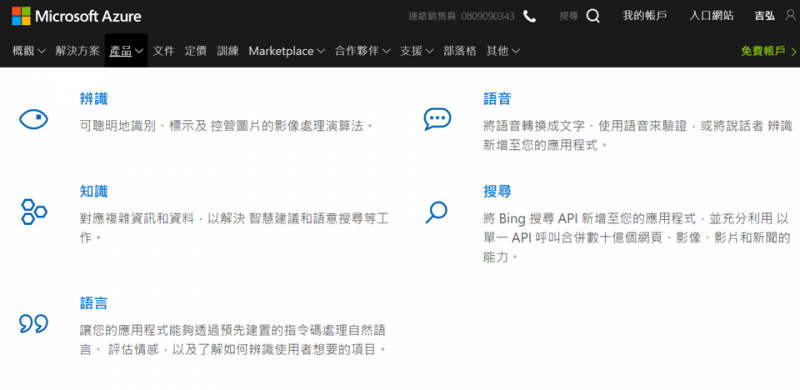
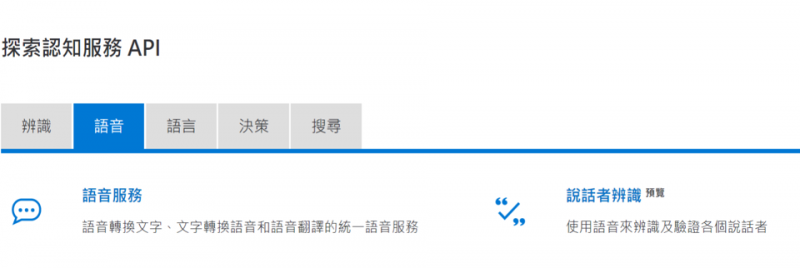
Microsoft Azure 認知服務一直是我們很愛用的範例,網站互動介面不錯,使用上也不難。申請好金鑰之後透過 Rest API 呼叫就好了。今天要使用的是語音服務。 三年前有做過 LinkIt 7688 結合認知服務 Face API 的專題,請大家參考。
如何在Azure中建立語音API服務
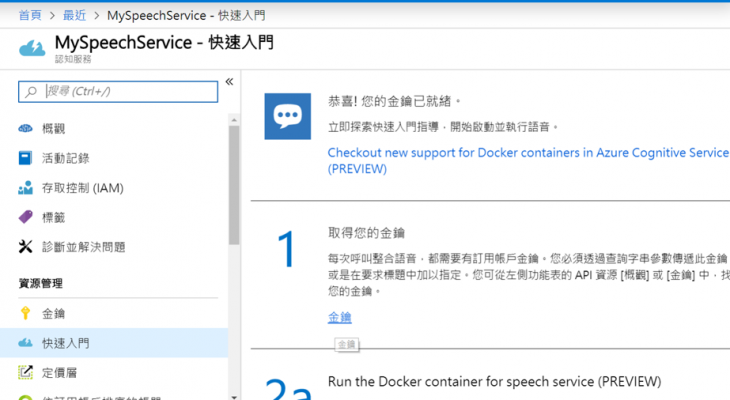
接下來說明如何在Azure中建立語音API服務,有兩種做法:使用 Azure 建立語音服務或申請七天免費金鑰。 請先登入 Azure portal,在左側點選[建立資源],搜尋[speech] [gallery columns="2" size="medium" ids="38664,38665"] 接著填入基本設定- 名稱:例如MySpeechService,這要填入後續程式碼中
- 訂用帳戶:自行帶出不用填
- 位置:美國西部,這會影響後續 api server 的名稱。如果選美國中部就會改成 centralus,以此類推
- 定價層:F0 / S0 -> 請選S0
- 資源:自訂
申請七天免費金鑰
如果您沒有正式的Azure帳號或只想試玩看看的話,可以申請七天的免費金鑰,使用上與先前的做法都是一樣的。不過,金鑰過期之後就無法再使用了。 [gallery columns="2" size="large" ids="38659,38660,38661,38658"]電腦端環境安裝
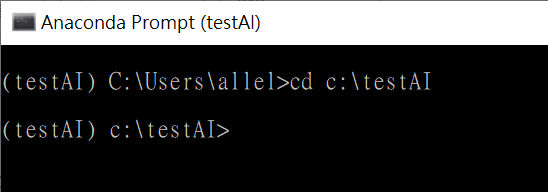
請參考本文在您的電腦端建立一個Anaconda Python 3.7 的虛擬環境。簡述步驟如下:- 建立工作資料夾,例如 C:\testAI 或 D:\testAI
- 安裝 Anaconda Python 3.7 version
- 程式集 → 開啟Anaconda prompt,建立虛擬環境
- 完成會看到一個有 testAI名稱的 prompt,後續指令都在這裡輸入
範例1:語音輸入轉文字
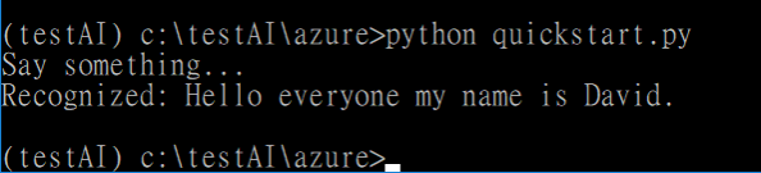
本範例會開啟裝置上的麥克風,並把辨識結果顯示在 console。請確認麥克風正常,講點話,系統會把聲音來源以英文轉換為文字,並顯示出來。程式碼請參考本段最後。 [pastacode lang="python" manual="python%20quickstart.py" message="" highlight="" provider="manual"/]
[pastacode lang="python" manual="import%20azure.cognitiveservices.speech%20as%20speechsdk%0A%0A%23%20Creates%20an%20instance%20of%20a%20speech%20config%20with%20specified%20subscription%20key%20and%20service%20region.%0A%23%20Replace%20with%20your%20own%20subscription%20key%20and%20service%20region%20(e.g.%2C%20%22westus%22).%0Aspeech_key%2C%20service_region%20%3D%20%2239aca37122c049dfae2420933131f684%22%2C%20%22westus%22%0Aspeech_config%20%3D%20speechsdk.SpeechConfig(subscription%3Dspeech_key%2C%20region%3Dservice_region)%0A%0A%23%20Creates%20a%20recognizer%20with%20the%20given%20settings%0Aspeech_recognizer%20%3D%20speechsdk.SpeechRecognizer(speech_config%3Dspeech_config)%0A%0Aprint(%22Say%20something...%22)%0A%0A%0A%23%20Starts%20speech%20recognition%2C%20and%20returns%20after%20a%20single%20utterance%20is%20recognized.%20The%20end%20of%20a%0A%23%20single%20utterance%20is%20determined%20by%20listening%20for%20silence%20at%20the%20end%20or%20until%20a%20maximum%20of%2015%0A%23%20seconds%20of%20audio%20is%20processed.%20%20The%20task%20returns%20the%20recognition%20text%20as%20result.%20%0A%23%20Note%3A%20Since%20recognize_once()%20returns%20only%20a%20single%20utterance%2C%20it%20is%20suitable%20only%20for%20single%0A%23%20shot%20recognition%20like%20command%20or%20query.%20%0A%23%20For%20long-running%20multi-utterance%20recognition%2C%20use%20start_continuous_recognition()%20instead.%0Aresult%20%3D%20speech_recognizer.recognize_once()%0A%0Aif%20('hello'%20in%20result)%3A%0A%20%20%20%20print(%22hello%22)%0A%0A%23%20Checks%20result.%0Aif%20result.reason%20%3D%3D%20speechsdk.ResultReason.RecognizedSpeech%3A%0A%20%20%20%20print(%22Recognized%3A%20%7B%7D%22.format(result.text))%0Aelif%20result.reason%20%3D%3D%20speechsdk.ResultReason.NoMatch%3A%0A%20%20%20%20print(%22No%20speech%20could%20be%20recognized%3A%20%7B%7D%22.format(result.no_match_details))%0Aelif%20result.reason%20%3D%3D%20speechsdk.ResultReason.Canceled%3A%0A%20%20%20%20cancellation_details%20%3D%20result.cancellation_details%0A%20%20%20%20print(%22Speech%20Recognition%20canceled%3A%20%7B%7D%22.format(cancellation_details.reason))%0A%20%20%20%20if%20cancellation_details.reason%20%3D%3D%20speechsdk.CancellationReason.Error%3A%0A%20%20%20%20%20%20%20%20print(%22Error%20details%3A%20%7B%7D%22.format(cancellation_details.error_details))" message="MS 語音API - 語音輸入轉文字" highlight="" provider="manual"/]
範例2:文字轉語音檔
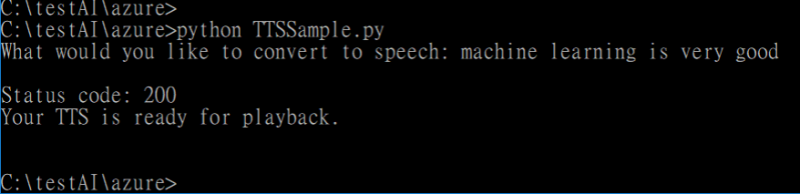
第二個範例是相反的流程。系統會把您在 console 輸入的文字(英文),發送到認知服務 server,再存成一個 .wav 檔。後續透過 pyaudio 這類的套件來撥放檔案即可。 [pastacode lang="python" manual="python%20TTSSample.py" message="" highlight="" provider="manual"/]
[pastacode lang="python" manual="'''%0AAfter%20you've%20set%20your%20subscription%20key%2C%20run%20this%20application%20from%20your%20working%0Adirectory%20with%20this%20command%3A%20python%20TTSSample.py%0A'''%0Aimport%20os%2C%20requests%2C%20time%0Afrom%20xml.etree%20import%20ElementTree%0Afrom%20playsound%20import%20playsound%0A%0A%23%20This%20code%20is%20required%20for%20Python%202.7%0Atry%3A%20input%20%3D%20raw_input%0Aexcept%20NameError%3A%20pass%0A%0A'''%0AIf%20you%20prefer%2C%20you%20can%20hardcode%20your%20subscription%20key%20as%20a%20string%20and%20remove%0Athe%20provided%20conditional%20statement.%20However%2C%20we%20do%20recommend%20using%20environment%0Avariables%20to%20secure%20your%20subscription%20keys.%20The%20environment%20variable%20is%0Aset%20to%20SPEECH_SERVICE_KEY%20in%20our%20sample.%0A%0AFor%20example%3A%0Asubscription_key%20%3D%20%22Your-Key-Goes-Here%22%0A'''%0A%0Aif%20'SPEECH_SERVICE_KEY'%20in%20os.environ%3A%0A%20%20%20%20subscription_key%20%3D%20os.environ%5B'SPEECH_SERVICE_KEY'%5D%0Aelse%3A%0A%20%20%20%20print('Environment%20variable%20for%20your%20subscription%20key%20is%20not%20set.')%0A%20%20%20%20exit()%0A%0Aclass%20TextToSpeech(object)%3A%0A%20%20%20%20def%20__init__(self%2C%20subscription_key)%3A%0A%20%20%20%20%20%20%20%20self.subscription_key%20%3D%20subscription_key%0A%20%20%20%20%20%20%20%20self.tts%20%3D%20input(%22What%20would%20you%20like%20to%20convert%20to%20speech%3A%20%22)%0A%20%20%20%20%20%20%20%20self.timestr%20%3D%20time.strftime(%22%25Y%25m%25d-%25H%25M%22)%0A%20%20%20%20%20%20%20%20self.access_token%20%3D%20None%0A%0A%20%20%20%20'''%0A%20%20%20%20The%20TTS%20endpoint%20requires%20an%20access%20token.%20This%20method%20exchanges%20your%0A%20%20%20%20subscription%20key%20for%20an%20access%20token%20that%20is%20valid%20for%20ten%20minutes.%0A%20%20%20%20'''%0A%20%20%20%20def%20get_token(self)%3A%0A%20%20%20%20%20%20%20%20fetch_token_url%20%3D%20%22https%3A%2F%2Fwestus.api.cognitive.microsoft.com%2Fsts%2Fv1.0%2FissueToken%22%0A%20%20%20%20%20%20%20%20headers%20%3D%20%7B%0A%20%20%20%20%20%20%20%20%20%20%20%20'Ocp-Apim-Subscription-Key'%3A%20self.subscription_key%0A%20%20%20%20%20%20%20%20%7D%0A%20%20%20%20%20%20%20%20response%20%3D%20requests.post(fetch_token_url%2C%20headers%3Dheaders)%0A%20%20%20%20%20%20%20%20self.access_token%20%3D%20str(response.text)%0A%0A%20%20%20%20def%20save_audio(self)%3A%0A%20%20%20%20%20%20%20%20base_url%20%3D%20'https%3A%2F%2Fwestus.tts.speech.microsoft.com%2F'%0A%20%20%20%20%20%20%20%20path%20%3D%20'cognitiveservices%2Fv1'%0A%20%20%20%20%20%20%20%20constructed_url%20%3D%20base_url%20%2B%20path%0A%20%20%20%20%20%20%20%20headers%20%3D%20%7B%0A%20%20%20%20%20%20%20%20%20%20%20%20'Authorization'%3A%20'Bearer%20'%20%2B%20self.access_token%2C%0A%20%20%20%20%20%20%20%20%20%20%20%20'Content-Type'%3A%20'application%2Fssml%2Bxml'%2C%0A%20%20%20%20%20%20%20%20%20%20%20%20'X-Microsoft-OutputFormat'%3A%20'riff-24khz-16bit-mono-pcm'%2C%0A%20%20%20%20%20%20%20%20%20%20%20%20'User-Agent'%3A%20'YOUR_RESOURCE_NAME'%0A%20%20%20%20%20%20%20%20%7D%0A%20%20%20%20%20%20%20%20xml_body%20%3D%20ElementTree.Element('speak'%2C%20version%3D'1.0')%0A%20%20%20%20%20%20%20%20xml_body.set('%7Bhttp%3A%2F%2Fwww.w3.org%2FXML%2F1998%2Fnamespace%7Dlang'%2C%20'en-us')%0A%20%20%20%20%20%20%20%20voice%20%3D%20ElementTree.SubElement(xml_body%2C%20'voice')%0A%20%20%20%20%20%20%20%20voice.set('%7Bhttp%3A%2F%2Fwww.w3.org%2FXML%2F1998%2Fnamespace%7Dlang'%2C%20'en-US')%0A%20%20%20%20%20%20%20%20voice.set('name'%2C%20'en-US-Guy24kRUS')%20%23%20Short%20name%20for%20'Microsoft%20Server%20Speech%20Text%20to%20Speech%20Voice%20(en-US%2C%20Guy24KRUS)'%0A%20%20%20%20%20%20%20%20voice.text%20%3D%20self.tts%0A%20%20%20%20%20%20%20%20body%20%3D%20ElementTree.tostring(xml_body)%0A%0A%20%20%20%20%20%20%20%20response%20%3D%20requests.post(constructed_url%2C%20headers%3Dheaders%2C%20data%3Dbody)%0A%20%20%20%20%20%20%20%20'''%0A%20%20%20%20%20%20%20%20If%20a%20success%20response%20is%20returned%2C%20then%20the%20binary%20audio%20is%20written%0A%20%20%20%20%20%20%20%20to%20file%20in%20your%20working%20directory.%20It%20is%20prefaced%20by%20sample%20and%0A%20%20%20%20%20%20%20%20includes%20the%20date.%0A%20%20%20%20%20%20%20%20'''%0A%20%20%20%20%20%20%20%20if%20response.status_code%20%3D%3D%20200%3A%0A%20%20%20%20%20%20%20%20%20%20%20%20with%20open('sample-001.wav'%2C%20'wb')%20as%20audio%3A%0A%20%20%20%20%20%20%20%20%20%20%20%20%23with%20open('sample-'%20%2B%20self.timestr%20%2B%20'.wav'%2C%20'wb')%20as%20audio%3A%0A%20%20%20%20%20%20%20%20%20%20%20%20%20%20%20%20audio.write(response.content)%0A%20%20%20%20%20%20%20%20%20%20%20%20%20%20%20%20print(%22%5CnStatus%20code%3A%20%22%20%2B%20str(response.status_code)%20%2B%20%22%5CnYour%20TTS%20is%20ready%20for%20playback.%5Cn%22)%0A%20%20%20%20%20%20%20%20else%3A%0A%20%20%20%20%20%20%20%20%20%20%20%20print(%22%5CnStatus%20code%3A%20%22%20%2B%20str(response.status_code)%20%2B%20%22%5CnSomething%20went%20wrong.%20Check%20your%20subscription%20key%20and%20headers.%5Cn%22)%0A%0Aif%20__name__%20%3D%3D%20%22__main__%22%3A%0A%20%20%20%20app%20%3D%20TextToSpeech(subscription_key)%0A%20%20%20%20app.get_token()%0A%20%20%20%20app.save_audio()%0A%20%20%20%20playsound('sample-001.wav')" message="MS 語音API - 文字轉語音輸出" highlight="" provider="manual"/]
留言 💬 (0)
還沒有留言,來當第一個。